
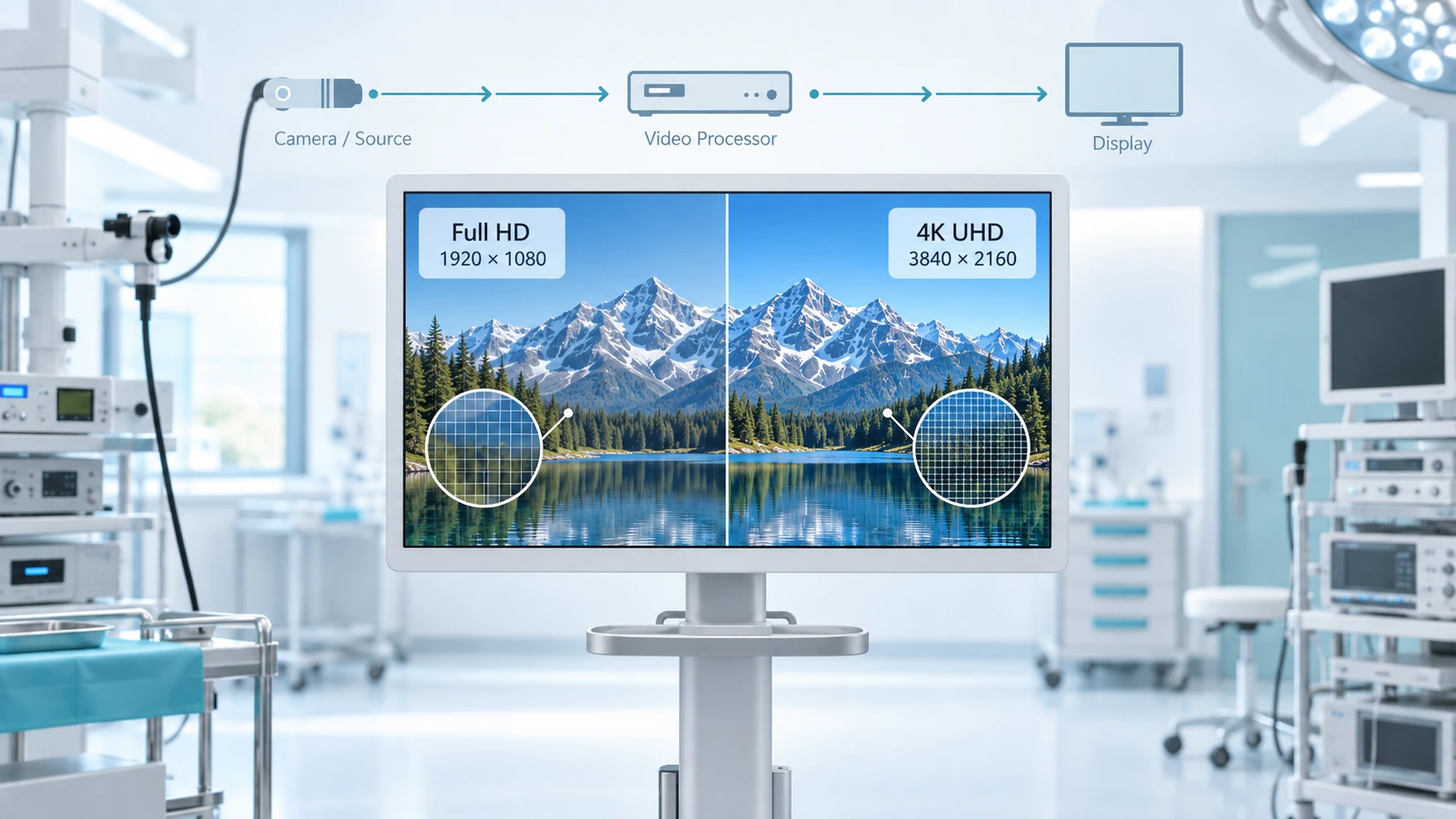
Choosing between a Full HD (1920 x 1080) and 4K UHD (3840 x 2160) surgical monitor is not simply a matter of comparing pixel counts.
In an endoscopy or operating-room video system, the monitor can only display the signal that reaches it. A camera may support 4K while a processor, recorder, router, or converter elsewhere in the path still limits the signal to Full HD. An existing 1080p system may also use a 4K display as part of a staged equipment upgrade.
Short answer: Full HD can remain appropriate when the source and active video path are natively 1080p and no near-term 4K migration is planned. A 4K surgical monitor becomes easier to justify when the source and signal path support compatible 4K, or when the display conditions and equipment roadmap give the system a clear reason to use it. A 4K panel alone does not turn a Full HD capture into native 4K.
In this article, “4K” primarily refers to 4K UHD at 3840 x 2160. ITU-T F.780.1 defines 4K UHD in medical imaging as 3840 x 2160. Some 2160-line video formats also use 4096 x 2160, so the exact active format should be verified during system integration.
Start With the Active Signal
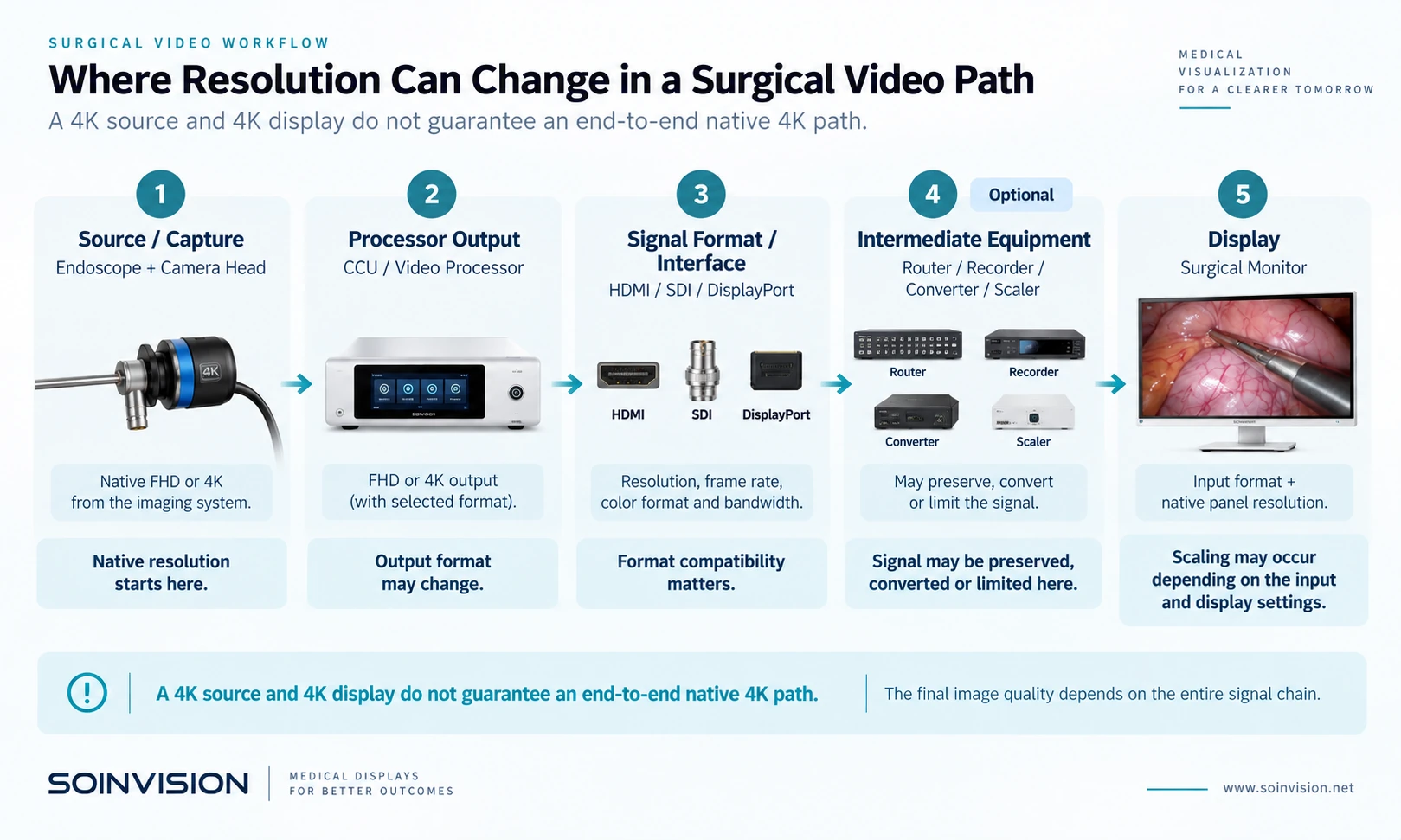
A surgical monitor usually sits near the end of the video chain.
Depending on the system, the image may pass through a camera or endoscope, camera control unit, video processor, recorder, router, converter, or image-processing platform before reaching the display.
Resolution can therefore describe several different points in the same system.
Source resolution is the image information generated by the camera or imaging source.
Processor output resolution is the format leaving the camera control unit or video processor.
Active video signal is the resolution and format actually travelling through HDMI, SDI, DisplayPort, or another video path.
Panel resolution is the monitor’s native physical resolution.
Rendered presentation is the final image after scaling or processing before or inside the display.
These stages are not interchangeable.
A Full HD source shown on a 4K panel is different from a native 4K source shown on the same panel. Likewise, having a 4K-capable camera and a 4K monitor does not prove that the path between them remains 4K.
The first step is to identify the signal that actually reaches the monitor.
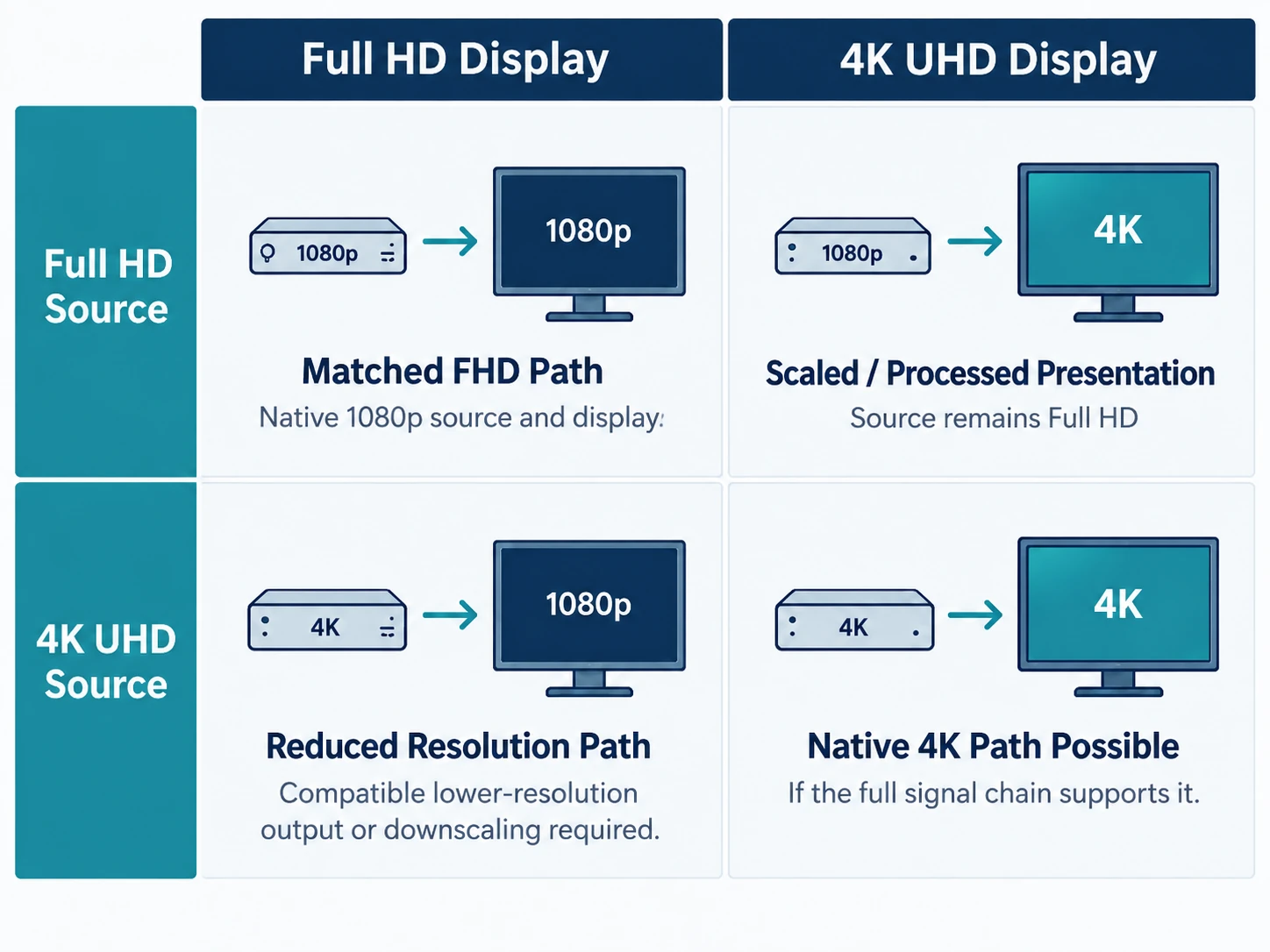
Four Common Full HD and 4K Configurations
Full HD Source to Full HD Display
This is the most straightforward arrangement.
The source and display operate at the same basic resolution level. If an existing endoscopy or surgical video system is designed around Full HD and there is no planned near-term move to native 4K, a Full HD monitor can remain a practical choice.
Full HD Source to 4K Display
When a Full HD image is shown across a 4K panel, the lower-resolution input is mapped to the higher-resolution pixel grid, typically through scaling or additional image processing.
The original source information remains Full HD.
A 4K display may still make sense because of a future source upgrade, larger display requirements, multi-view use, image-processing capabilities, or a broader move toward a 4K equipment platform.
What it does not do is convert the original Full HD capture into native 4K.
4K Source to Full HD Display
A Full HD-only panel cannot natively present a 3840 x 2160 image at its original panel resolution.
The source must provide a compatible lower-resolution output, or the signal must be converted or downscaled before reaching the display.
That may be intentional in a mixed-resolution system. If native 4K presentation is a project requirement, however, the point where the resolution is reduced needs to be identified.
4K Source to 4K Display
This is the clearest case for a 4K surgical monitor, but the source and display are only the endpoints.
The processor output, intermediate equipment, transmission path, and monitor input still need to support the intended resolution, frame rate, and signal format.
Native 4K and Upscaled Full HD Are Different
A 1920 x 1080 source can be processed for presentation on a 3840 x 2160 panel. The quality of that presentation depends partly on the scaling and image-processing method used by the display or by an external processing stage.
Upscaling does not change the original capture into a native 4K source.
This distinction is important when evaluating functions described as 1080p-to-4K. The term describes the processing and presentation of a lower-resolution source on a higher-resolution display, not a change in the original capture resolution.
For a system migrating gradually from Full HD to 4K, three questions are useful:
- What resolution is captured today?
- How is that source presented on the current display?
- When will the upstream equipment actually move to native 4K?
Check the Path, Not Just the Connector
A resolution upgrade can affect processors, routers, recorders, converters, distribution equipment, and additional displays.
For each major stage, the relevant information is the input format, output format, frame rate, and whether scaling or conversion occurs.
Connector names alone do not confirm compatibility.
Two devices may both provide HDMI while supporting different combinations of resolution and frame rate. The same principle applies to SDI.
SMPTE ST 2082-10 defines the mapping of specific 2160-line source formats over single-link 12G-SDI. It also illustrates why saying that a device “has 12G-SDI” is not enough by itself: the exact format supported by both ends still matters.
For an integration project, the useful question is:
What signal is passing through the connector, and do both devices support that format?
Screen Size and Viewing Conditions Matter
The practical value of higher resolution also depends on how the display is used.
Screen size, viewing distance, viewing position, the number of viewers, and the amount of screen area assigned to each source can all affect the decision.
A compact monitor used from a close viewing position creates a different condition from a large-format display used for shared viewing across an operating room. Multi-view layouts can also divide the available panel area between several sources.
There is no useful universal rule that assigns Full HD or 4K to a particular screen size by itself.
Separate Resolution From Other Monitor Features
A 4K surgical monitor may also include features such as HDR modes, broader color-space options, multi-view layouts, 12G-SDI, image processing, or additional image controls.
Those capabilities may influence the product decision, but they are not created by the 3840 x 2160 pixel count itself.
A project may choose a particular 4K display because it requires a specific interface configuration, PIP/PBP layout, image-processing function, or color-management option.
That is different from choosing it specifically for higher native panel resolution.
Keeping those two decisions separate makes it easier to understand what the project actually requires.
A System Can Use Both Full HD and 4K
Not every branch of a medical video system needs to operate at the same resolution.
A native 4K path may feed the primary surgical monitor while another output continues to a Full HD recorder or an existing observation display. Conversely, a system may still use a Full HD camera while adopting a 4K monitor ahead of a future source upgrade.
The more useful question is:
Which part of the video path actually needs native 4K?
A secondary display should not automatically be assigned Full HD simply because it is secondary. Its requirement depends on the source, signal path, viewing role, and equipment connected to it.
When Full HD Still Makes Sense
Full HD can remain appropriate when the imaging source and surrounding infrastructure are built around 1080p, there is no planned near-term move to native 4K, and a higher-resolution panel does not solve a defined project requirement.
For an established Full HD platform, replacing only the final monitor may have limited system-level value if the upstream equipment remains unchanged.
When 4K Makes More Sense
A 4K surgical monitor becomes easier to justify when the source provides native 4K, the intermediate path preserves the required format, and the display conditions can make meaningful use of the higher pixel density.
It may also fit a staged equipment roadmap where the current source remains Full HD but the next generation is moving toward native 4K.
The reason to choose 4K should come from the design of the system rather than from 4K simply being the higher specification.
Once the project has a justified 4K requirement, the next step is to choose the right 4K surgical monitor configuration for the application, interfaces, viewing conditions, and integration plan.
Full HD or 4K? A Practical Decision Table
| Project condition | What it means | Direction to consider |
|---|---|---|
| Native Full HD source, established Full HD path, no planned 4K migration | The system is already matched around 1080p | Full HD may remain appropriate |
| Full HD source with a planned future move to native 4K | The monitor may become part of a staged upgrade | Consider whether adopting 4K now supports the equipment roadmap |
| Full HD source connected to a 4K panel | The source is scaled or processed for presentation on the higher-resolution panel | Evaluate the processing method and the other reasons for selecting the 4K monitor |
| Native 4K source with an intermediate stage limited to Full HD | The path contains a resolution bottleneck | Decide whether that bottleneck should remain or be upgraded |
| Native 4K source with a compatible 4K path | The monitor can receive native 4K when formats are matched | A 4K surgical monitor is the natural direction |
| Mixed Full HD and 4K outputs | Different branches serve different purposes | Evaluate each display or recording path separately |
Use the Upgrade Plan, Not the Word “Future-Proof”
For medical-device manufacturers, OEM projects, distributors, and system integrators, the display decision often depends on the replacement cycle of the wider equipment platform.
A product may use Full HD cameras today but move to native 4K sources in its next generation. Adopting a 4K monitor earlier can then form part of a staged migration.
Another system may have no planned source change for several years. If the rest of the path remains Full HD, replacing the monitor alone may provide limited value.
Before committing to the upgrade, identify where 4K first enters the system, which devices preserve it, and where the signal is converted or reduced. That usually reveals whether the monitor is the actual bottleneck or simply the most visible component in the chain.
Questions About Full HD and 4K Surgical Monitor Integration
Is 12G-SDI required for every 4K surgical monitor installation?
No.
12G-SDI is one method for carrying compatible 2160-line signals through a single SDI link, but it is not the only possible 4K transport architecture.
Depending on the equipment and signal format, 4K workflows may also use HDMI, DisplayPort, or multi-link SDI configurations.
The relevant standard is SMPTE ST 2082-10 for single-link 12G-SDI carriage of specified 2160-line source formats. The actual resolution, frame rate, and signal format supported by both devices should still be verified.
Do all devices need to be replaced when moving from Full HD to 4K?
Not necessarily.
The answer depends on where the existing system already supports the required 4K format and where it does not.
A camera processor may already provide a compatible 4K output while a recorder or routing device remains limited to Full HD. In another installation, the transmission path may already be suitable and only one endpoint needs to change.
Mapping the existing path is more useful than assuming the entire system must be replaced at once.
Before You Specify the Monitor
By this point, the choice should be based on a small number of concrete facts rather than on the resolution label alone.
Start with the camera or imaging source, then follow the actual output through the processor and any intermediate equipment until it reaches the monitor. Note where the format changes, whether the intended frame rate is preserved, and whether the display accepts the resulting signal.
Then look at the project beyond the current installation. If the system is expected to remain Full HD for its service life, a well-matched 1080p path may be entirely rational. If the next equipment generation is already moving toward native 4K, the display decision may form part of that migration.
The monitor should therefore be treated as one component of the imaging chain, not as an isolated specification.
SOINVISION develops 4K surgical displays for endoscopy, operating-room visualization, and medical video integration. For projects evaluating a Full HD-to-4K transition, the most useful starting point is to map the existing video path and identify the signal that will actually reach the display.